Review Comments (2) Screenshots (11) Questions & Answers (1) Votes (105) Awards (7) Wiki  
(105)
Adobe Systems Incorporated
3.6.1
www.adobe.com
Shareware
$299  Purchase
21 639 people
Download Adobe Photoshop...

237 MBDownloaded 3583 times

 
Video tutorial for Adobe Photoshop Lightroom 3.5
Frame

Review

This is official description

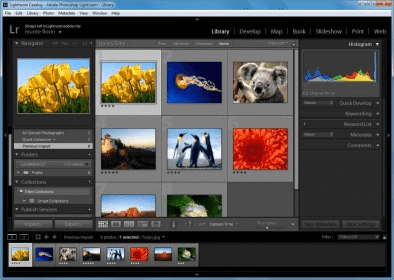
Adobe® Photoshop® Lightroom® 3 software helps you bring out the best in your photographs, whether you're perfecting one image, searching for ten, processing hundreds, or organizing thousands.Using it you can showcase your work in elegant print layouts, slide shows, and web galleries, as well as on popular photo-sharing sites.
 
The following review written by one of the Software Informer contributors applies to version 2.0

Adobe launched "Adobe Photoshop Lightroom", an elegant environment to perform, from just one application, all the actions that need to be done after taking a photo - that is, transfer it to the PC, edit it, and, finally, create a presentation or print it. The natural process starts by importing the photos to your PC. At this moment comes in action Lightroom's complete and intuitive cataloging system, whose only drawback is its speed when one tries to import many images at the same time. Apart from this, it is very powerful.

The second step is editing the photo, and for this purpose Adobe Photoshop Lightroom offers one of the most complete adjusting systems ever seen. The fact that it contains 60 different adjustment types says it all. These adjustments range from the classic brightness and contrast to tone (an interesting one), luminosity, exposure, saturation, color temperature, white balance, and so on, along with the powerful noise reduction, smoothing and focus filters. Finally, Adobe Lightroom has a pretty convenient system for printing photos, offering different ways of distributing them on one page.
  • Importing, cataloging and searching for photos is really easy.
  • Loads of adjustments.
  • Customizable exporting system.
  • Not free.
  • Slow when you try to import many photos at once.

Reviewed by: Daniel Zambrano

Reviewer rating:

Reviewed: 2 years ago

What's new in version 3.6

Accelerated performance
Support for DSLR video files
Image watermarking
Easy image importing
Perspective correction
More flexible print packages
Lens correction
Online sharing integration
Easy-to-share slide show videos with music
Tethered shooting
Film grain simulation
Report a wrong version Report a wrong program title Suggest a correction

Screenshots

Main window Main window Main window Main window Main window Main window Library & Settings Library & Settings
All 11 screenshots

Latest comments

Guest #18214831(beginner) 8 months ago 
Pros: plugin
Cons: error
Comment: hi plugin exteras perfect layers(for windows 7) is error what? please help me arcniner at gmail dot com
Reply
The_Mainlander(beginner) 2 years ago 
Awesome software and great format, just needs a way to have your images in a single view which you can move around to order.
Reply
Add new comment All 2 comments

E-mail Address:

Password:

Register now »

Forgot password?

Sign in with:
Download Software Informer Client
Copyright © 2012, Informer Technologies, Inc. About| Privacy and terms| Help| Feedback & Support| Partners program